Say it — it is typed. In any text field, on any site.
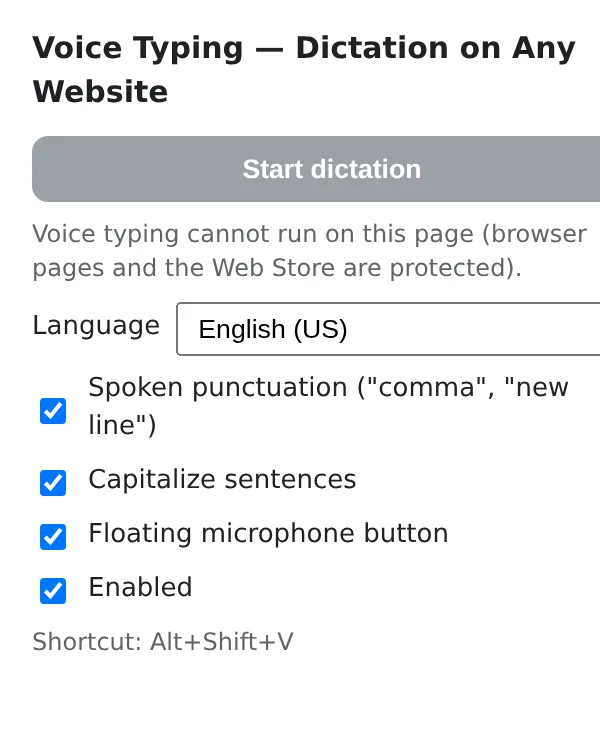
Click into a field, press Alt+Shift+V or the microphone, and speak. Punctuation by voice, capitals automatically, 60+ languages. Chrome's own speech recognition does the work; nothing is sent to us.
Add Voice Typing to Chrome — free
- Any text field
- Punctuation by voice
- 60+ languages
Voice input exists — just not where you need it
Phones dictate everywhere; the desktop browser does not. Gmail, a CRM form, a support chat, a forum editor, a comment box — each is a field with no microphone, so a long reply means typing it, even when saying it would take a third of the time.
One shortcut for every field
Alt+Shift+V starts dictation into whatever has the cursor: inputs, text areas, rich-text editors. A small microphone button also appears next to the active field when you prefer to click.
Punctuation you can say
«Comma», «period», «question mark», «new line», «new paragraph» become signs and breaks, not words. Sentences start with a capital letter on their own. Commands work in English, Spanish, Portuguese, French, German, Italian, Russian and Ukrainian.
Your language, remembered
Pick one of 60+ languages and dialects in the popup once; continuous mode keeps listening until you stop, and the interim text is shown while you speak so you see it arriving.
What you get
Replies, notes and forms spoken instead of typed — in the apps you already use, with the text landing exactly where the cursor is and your voice handled by the browser, not by a third-party server.
E-mail and support replies
Open the reply, press the shortcut, say the answer with its punctuation. Edit a word or two, send. A five-paragraph reply takes the time of saying it.
Notes and docs in web apps
Notion, Confluence, a wiki, a ticket description — fields that never had voice input get it. Dictate the first draft, then tidy it up by hand.
A second language
Many people speak a language better than they type it. Set the dialect once and dictate in it; the keyboard stays for corrections.
How this differs from the other ways to get voice into the browser
| Built-in voice input (Docs, Gmail on some systems) | Only inside those apps | Voice Typing: Every text field on every site |
|---|---|---|
| Operating-system dictation | Setup per OS, not always available | Voice Typing: One extension, same shortcut everywhere |
| Dictation web services | Speak there, copy, paste here | Voice Typing: Text lands where the cursor is |
| Typing | Hands and eyes on the keyboard | Voice Typing: Say it, then edit |
FAQ
Does it need an internet connection?
It uses Chrome's speech recognition, which on most systems runs through the browser vendor's service; dictation works wherever Chrome's voice input works. The extension itself has no server.
Where does my voice go?
To the browser's recognition service only. Voice Typing receives the recognised text inside the page and inserts it into the field — nothing is uploaded to us.
Why is there no microphone button on some fields?
Some editors live in frames or custom components. Use the shortcut: it targets the element that has the focus, including those.
Which languages have voice punctuation?
English, Spanish, Portuguese, French, German, Italian, Russian and Ukrainian. In other languages the recognised text is inserted as spoken and you add punctuation by hand.
What is free and what is Pro?
The microphone button, the languages and the settings are free, and the first dictation sessions are included. Voice Typing Pro removes the session limit — one Pro for every ExtSpace extension.
Voice Typing
Voice Typing adds dictation to every text field in Chrome: e-mail, docs, chats, forms. Spoken punctuation, automatic capitalisation, 60+ languages, Alt+Shift+V or a floating microphone. Recognition by the browser, no server of ours.
Add Voice Typing to Chrome — free